Refusing Prescriptions from the Workbench
There are two methods to refusing a prescription from the Workbench:
- Refusing a prescription from the Completed tab.
- Refusing a prescription with an Rx #
Use the dropdowns below to learn more information about each method.
 Refusing a prescription from the Completed tab
To refuse a prescription from the Completed tab:
- From the Workbench > Complete tab, locate and select the prescription that needs to be refused.
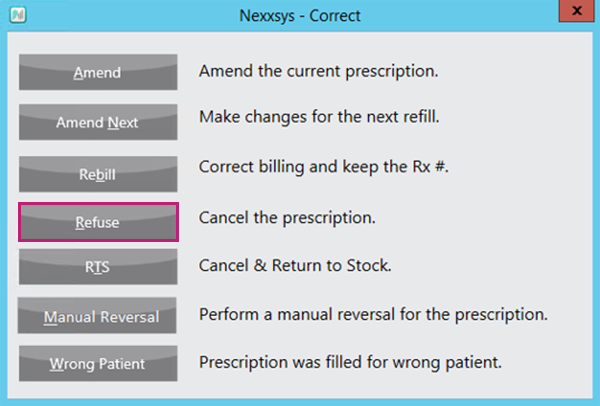
- Select Correct.

The Correct window appears. - Select Refuse.
A prompt appears to validate if the prescription(s) should be refused.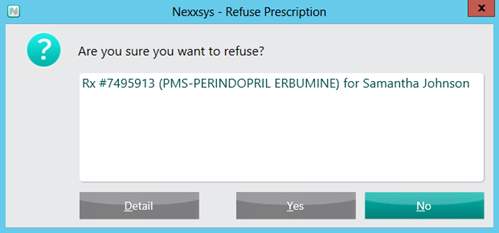
- Select Yes.
- If this is the first fill of this prescription, a prompt displays to validate if the prescription should be removed from the patient's Profile or placed on hold.
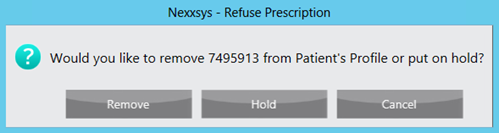
Select one of the following options:- Remove - removes the prescription from the patient's Profile.
- Hold - places the prescription on Hold.
Refusing a prescription with an Rx #
To refuse a prescription from the with a Rx #:
- From the Workbench > Complete tab, select Correct.
The Correct window appears. - Select Refuse.
The Select Prescription window appears. - In the Rx(s) field, enter the prescription number(s) of the prescriptions that need to be refused.
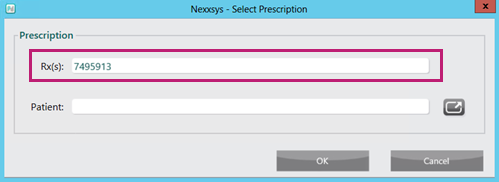
- If there is more than one prescription number, separate the numbers with a / symbol.
- Select OK. A prompt appears to validate if the prescription(s) should be refused.
- Select Yes.
- If this is the first fill of this prescription, a prompt displays to validate if the prescription should be removed from the patient's Profile or placed on hold.
Select one of the following options:- Remove - removes the prescription from the patient's Profile.
- Hold - places the prescription on Hold.